Part of the Buildings Series:
- Buildings Guide: Upgrade order for the whole city (Start Here).
- City Hall Requirements: What each level demands.
- Rise of Kingdoms Beginner Guide: The wider roadmap.
Quick Answer
City layout in Rise of Kingdoms is about speed of use, not stats. Building placement does not change production, defence or training rates. A good layout puts the buildings you tap twenty times a day within one screen, keeps decorations out of the way, and stops you hunting for your Hospital during a war. That is the entire benefit — and it is a real one.
Overview
Search "rise of kingdoms layout" and you will find layout codes for City Hall 4, 7, 8, 9 and beyond, presented as if the arrangement carries hidden bonuses. It does not. Your farms produce the same whether they are neatly ranked or scattered.
What a layout genuinely buys you is time and calm. During a rally or an event push you want your Hospital, City Hall, Academy and troop buildings reachable without scrolling. Over a year of daily play, that adds up to real hours — and during a fight it can matter.
What Layout Does Not Affect
To be completely clear:
- Production rates are identical regardless of placement.
- Defence is not affected by arrangement. There is no maze-building here — this is not a base-defence game.
- Training speed, research speed and healing are unaffected.
Anyone selling you a "meta" layout for stat reasons is selling you nothing.
What a Good Layout Does
Cluster by frequency. The buildings you touch daily go together, close to your default view:
- City Hall
- Academy
- Hospital
- Your primary troop building (whichever matches your troop type)
- Storehouse
Push the rest out. Resource buildings, secondary troop buildings and anything you touch weekly can live at the edges.
Keep decorations out of the working area. They are the main reason people find their city cluttered.
Leave the Wall accessible, since it is a recurring City Hall prerequisite and you will be upgrading it more than you expect.
Layouts by City Hall Level
City Hall 4–9. You do not have enough buildings to need a plan. Group your daily buildings near the centre and stop worrying about it.
City Hall 10–16. The city fills up. This is the right time to do one proper reorganisation: daily-use cluster in the middle, production out to the edges. Doing it once here saves rearranging later.
City Hall 17–25. Everything is built and your layout is essentially final. Optimise for war: Hospital and City Hall front and centre, troop buildings adjacent, everything else out of the way.
Copying a Layout
The game lets you rearrange buildings freely, and "layout codes" circulating online are usually just screenshots or a template someone recreated by hand. Use the save/share controls actually available in your current City Editor. A screenshot alone does not supply an import identifier.
Rearranging is free and takes a few minutes. Do it once at City Hall 10-ish, once more when the city is complete, and otherwise leave it alone.
What to Spend That Attention On Instead
Layout is the most cosmetic decision in the game. If you are optimising your city, the things that actually pay:
- Keeping the Academy running permanently — see how to increase power fast.
- Hospital capacity ahead of your first real war.
- Both builders busy, always.
- Marches out gathering overnight — see best gathering commanders.
Three Layout Plans You Can Recreate
These original diagrams show functional groups, not exact building footprints, a tested tile layout or import codes. Use the arrangement as a starting point and fit the buildings to the space your current city provides.
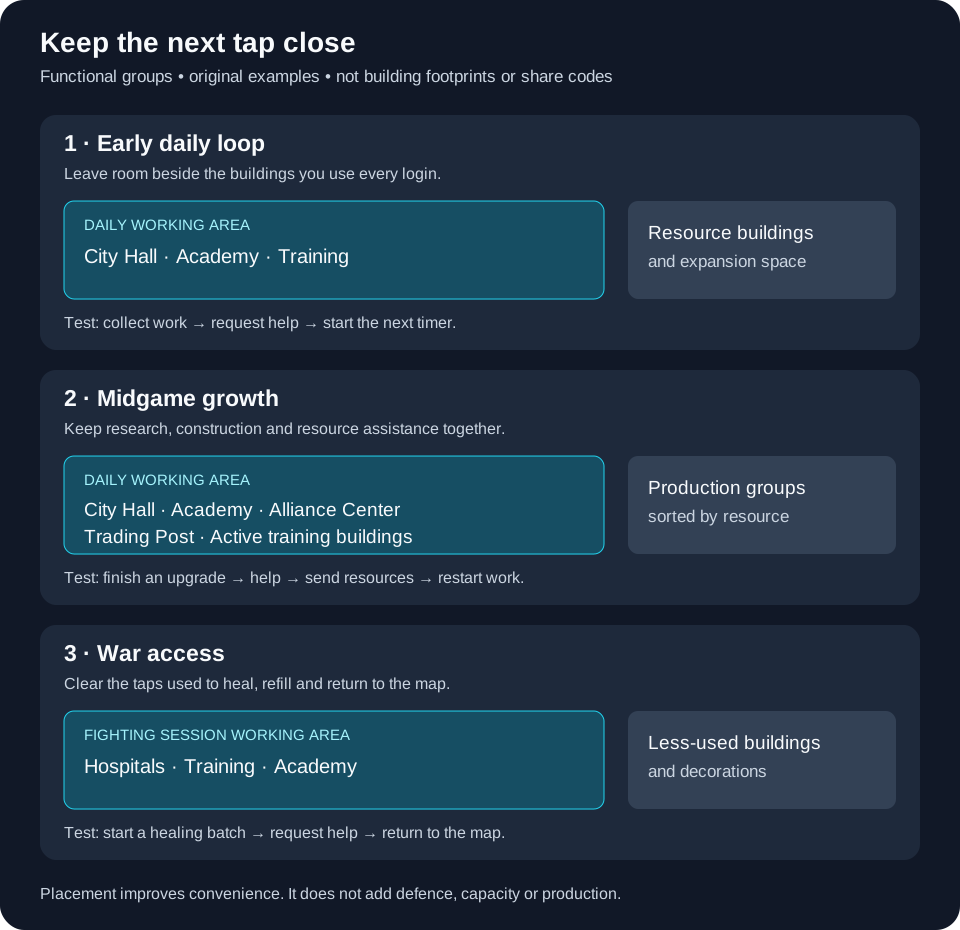
| Plan | Put near your usual view | Put toward the edge | When to use it |
|---|---|---|---|
| Early daily loop | City Hall, Academy and the troop buildings you use | Resource production and decorative space | You are still unlocking buildings and want quick routine taps |
| Midgame growth | City Hall, Academy, Alliance Center and Trading Post | Resource buildings grouped by type | You switch between construction, research and farm transfers |
| War access | Hospitals and active troop buildings, with Academy nearby | Decorations and less-used production buildings | You need to heal, refill and return to the map quickly |
For the early layout, leave expansion space beside the daily cluster. Do not make a beautiful sealed square that needs rebuilding when the next important building unlocks.
For the growth layout, walk through a normal login: claim completed work, request help, start the next timer and send resources. If one of those taps makes you pan across the whole city, move that building into the working area.
For the war layout, rehearse a healing cycle before the pass opens. Open a Hospital, start the intended batch, request help and return to the map. Keep visual clutter away from those taps. The benefit is quicker operation; arranging buildings does not create a defensive maze or increase hospital capacity.
Keep a screenshot of the arrangement you like before a major redesign. These plans contain no share identifier. Use any save or share controls actually present in your current City Editor; a screenshot from another account is not itself an import code.
Reference: Community city-layout examples. Source reviewed 9 September 2026; examples are editorial scenarios, not measured results.
FAQ
Does city layout matter in Rise of Kingdoms?
Only for convenience. There is no stat, defensive or production effect from building placement.
Can I copy another player's city layout?
Use an actual share identifier only if your current City Editor supports it. Otherwise recreate the arrangement from the image.
Is there a best layout for City Hall 8?
There is no mechanically best layout at any City Hall level. The best one is whichever puts your daily buildings within one screen.
Does building placement affect defence?
No. Defence comes from your Wall level, garrison commanders, troop tier and research — not from arrangement.
Can I move buildings freely?
Yes, rearranging is free. Do a proper pass around City Hall 10 and again when your city is complete.
Key Takeaways
- Layout affects convenience only — no stats, no defence, no production.
- Cluster daily-use buildings; push production and decorations to the edges.
- Reorganise once at mid-game and once when the city is complete.
- A layout image and a valid editor share identifier are different; the original plans here are diagrams.
- Spend the saved attention on the Academy and your gathering routine.